

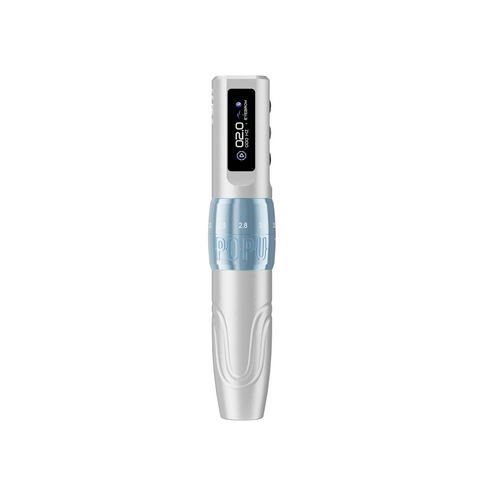

A fine brow stroke and a soft shaded transition ask different things of your hand. Choose the Biomaser U1 when you want to adjust the machine's working feel as you move between those tasks. Six stroke settings from 2.0 to 3.5 mm, a standard universal cartridge connection and two 850 mAh batteries give you a flexible wireless setup built around the way you work.
For an artist developing several techniques, that flexibility is the strongest reason to choose U1. If you already favour one stroke length for almost everything you do, a fixed-stroke pen offers a simpler routine. Here is how to decide, then put together the power and cartridge configuration you will actually use.
One familiar pen, more room to shape the working feel
Stroke describes the distance the machine drives the needle assembly through each cycle. U1 lets you vary that travel across six settings within its 2.0–3.5 mm range. You keep the same pen in your hand while exploring the response you prefer for fine lines, shaded transitions and more defined contours.
That matters when your work is varied. A brow design may call for individual strokes in one area and soft colour in another; lip work can move from a carefully defined edge to broader shading. An adjustable machine gives you another way to tune your setup alongside the cartridge arrangement and your hand movement. Stroke and needle protrusion are separate adjustments: the stroke controls cyclic travel, while protrusion is how far the tip extends from the cartridge.
U1 is our recommendation when you want that range of adjustment in one wireless PMU pen. It is also a useful choice for building a practice routine around several techniques, because you can compare settings without changing the whole machine. A fixed-stroke pen makes more sense when a single working response already suits your routine and you prefer fewer adjustments. The PMU machine selection guide helps you compare those machine paths.
Choose the two-battery package for a wireless routine
The U1 includes two 850 mAh batteries. Having a second battery gives you a practical rotation: prepare a charged spare before your appointments, then exchange batteries between sessions as needed. Working wirelessly also keeps a power cable out of your working hand, giving you more freedom to reposition around your design.
Start with the two-battery package if wireless use is your priority. Choose a two-battery-plus-RCA package when you also want the RCA connection for a compatible external power setup. That option adds the connector; the external power supply is a separate part of the setup.
- 2 batteries: the direct choice for your wireless working routine.
- 2 batteries + RCA: adds a wired connection option for artists who use an external power setup.
The pen is offered in Barbie Pink, Black and Coffee, with Black, Pink or Coffee RCA selections. Once you have chosen your power arrangement, select your preferred finish on the Biomaser U1 page, where current prices and available combinations are shown together.
Build the cartridge choice around the mark
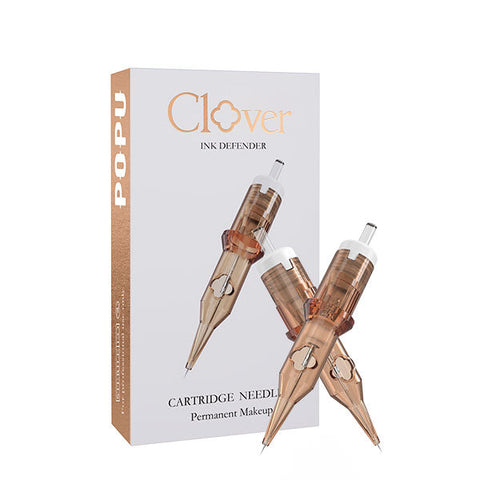
U1 accepts standard universal PMU cartridges, including Pinky Pro and Pinky Ultra. This gives you access to a broad choice of working points: a single needle for closely placed detail, a round shader for local colour, or a wider arrangement when coverage becomes the main task.
For hair strokes and precise contours: start with Pinky Pro 1R
Our first choices are 0601RL / 1R / 0.20 mm or 0801RL / 1R / 0.25 mm. Choose 0.20 mm when you want a finer working point; choose 0.25 mm when you prefer a little more needle body for the line technique you already use. Both give you a single point for a deliberate curve, a fine ending or a small finishing detail. Choose your Pinky Pro 1R diameter and pack.
For local shading: add a round shader
For an accompanying shading cartridge, begin by comparing 1003RS / 3RS / 0.30 mm with 1005RS / 5RS / 0.30 mm. The three-point grouping offers a smaller arrangement for local colour; the five-point grouping gives you more points across the working area. It is a useful pair to compare when your design moves from narrow shaded sections to more open areas. Explore Pinky Pro RS configurations, or use the PMU cartridge selection guide when your technique calls for flat or magnum arrangements.
Pinky Pro combines 304 stainless steel needles and EO sterilisation with a silicone safety membrane and transparent medical-grade PC housing. The membrane provides a protective barrier against pigment and fluid backflow, while the clear housing keeps the needle tip and pigment visible as you work. These shared quality features let you choose the geometry for the job while keeping a consistent professional standard across your cartridge selection.
Make the new setup feel familiar before the appointment
A useful first practice session has a specific purpose: compare the setting that feels best for a line, a transition or a shaded area you regularly create. Keep the cartridge and design consistent while changing the stroke setting, then compare your marks side by side. Once you find a useful starting point, work on the next part of the design.
An A4 hairstroke practice sheet gives you space for repeated lines and adjacent comparisons. A 3D eyebrow practice model is the next step when you want to work around a brow's shape. Choose the surface for the skill you want to develop, so practice has a clear place in your setup.
For a focused starting configuration, choose U1 with two batteries and Pinky Pro 1R in 0.20 or 0.25 mm. Add a 3RS or 5RS when shading is part of your work, and choose the RCA package if you also use external power. Select your U1 power package and colour to build that setup around your next working day.