


For individual brow hairs and close finishing work, start with Pinky Pro 1R. Choose RL when you want a compact group of points for a more substantial contour, RS for soft local shading, and U or CM when the job calls for broader colour coverage. The useful starting question is what mark you need to make: a fine line, a defined edge, a soft transition or a filled area.
A good cartridge selection gives every part of the appointment the right tool. Below, you will find specific Pinky Pro configurations for those tasks, a clear reason to choose Pinky Ultra, and a pack-price example to help you plan your order.
The cartridge for the mark in front of you
Imagine a brow appointment with three separate jobs: build individual hairs, add definition where the design needs it, and soften a transition. A single-point cartridge gives you a narrow working footprint for the hairs. A compact liner grouping gives you a different way to build a contour. A shader spreads the working points for colour and gradients.
That distinction is why a useful cartridge selection contains complementary configurations. A fine-detail cartridge earns its place through precision; a wider arrangement earns its place through coverage. Buy for the techniques you perform regularly, then add a new configuration when it solves a specific part of the work.
Individual brow hairs, fine lip borders, small finishing details
- Recommended starting family
- 1R
- Why choose it
- One point gives you a focused footprint for an individual line or detail.
- Current Pinky Pro examples
- 0601RL / 0.20 mm; 0801RL / 0.25 mm
Defined lines and compact contours
- Recommended starting family
- RL
- Why choose it
- A tight grouping brings several working points into a compact arrangement.
- Current Pinky Pro examples
- 0803RL / 3RL / 0.25 mm; 1003RL / 3RL / 0.30 mm
Soft local shading and gradual colour transitions
- Recommended starting family
- RS
- Why choose it
- A looser round arrangement suits local colour and gradients.
- Current Pinky Pro examples
- 1003RS / 3RS / 0.30 mm; 1005RS / 5RS / 0.30 mm
Single-row shading and broader transitions
- Recommended starting family
- F or U
- Why choose it
- A row of points covers a wider band; U adds a curved single-row arrangement.
- Current Pinky Pro examples
- 1005F / 5F / 0.30 mm; 0411U / 11U / 0.18 mm
Broader lip or areola colour work
- Recommended starting family
- MG or CM
- Why choose it
- Multiple rows give you broader coverage; CM uses a curved arrangement.
- Current Pinky Pro examples
- 0805MG / 5MG / 0.25 mm; 0807CM / 7CM / 0.25 mm
Textured shading and tonal layering
- Recommended starting family
- XF
- Why choose it
- The single row uses points at different heights for a different shading approach.
- Current Pinky Pro examples
- 1005XF / 5XF / 0.30 mm
For hair strokes, begin with a focused working point
Pinky Pro 1R is our first recommendation when the design depends on individual marks. Its single point is useful for the direction of a brow hair, a refined lip edge or a small correction to a contour. For artists comparing the range for the first time, start with 0.20 or 0.25 mm. Compare 0.20 mm for a finer working point with 0.25 mm for more needle body, then choose the one that fits your line technique.
The finer 0.16 and 0.18 mm options belong at the delicate end of the range. Larger single-point diameters, from 0.30 to 0.50 mm, let you retain the 1R arrangement with a thicker needle. The number of points and the diameter answer two different practical questions: how the points are arranged, and the thickness of each needle.
When you want a compact group rather than one point, choose Pinky Pro RL. 0803RL / 0.25 mm is our first recommendation for a finer three-point liner; 1003RL / 0.30 mm brings thicker needles to the same three-point arrangement. Both use a 5 mm long taper, an elongated narrowing tip for a fine working point. Choose between them by the needle diameter and the line technique you prefer.
For the next cartridge comparison, use the long-taper liner guide to examine taper alongside your chosen diameter.
To bring the fine-point choice into a complete brow setup, follow the hair-stroke brow guide through colour, pen response and a repeatable practice exercise.
For soft colour, choose between local control and broader coverage
Pinky Pro RS is the starting recommendation for soft local colour and gradients. A round shader's looser arrangement gives it a different working footprint from a tight liner. Start by comparing 3RS and 5RS when you want to work on smaller areas and gradual transitions.
For a broader sweep, move to a row-based arrangement. Pinky Pro F offers 5F and 7F at 0.30 mm. The 0411U uses 11 points at 0.18 mm in a curved single row, with a medium taper. Choose it when wider coverage and gradual blending are central to your technique.
For larger lip or areola colour work, compare MG and CM. MG provides the broader, multi-row approach; CM adds a curved arrangement. Pinky Pro CM is available in 5CM, 7CM and 9CM at 0.25 mm, giving you several coverage choices within the same family. XF offers a separate single-row arrangement with points at different heights, for artists developing textured shading and layered colour.
Where Pinky Ultra fits
Pinky Ultra has the highest needle hardness and toughness among the cartridges ATTO sells. Make it your first choice when needle hardness and toughness lead your purchase. Its current options cover 1R at 0.25 or 0.30 mm, 3RL at 0.25 mm, and 11U at 0.18 mm, in 10-cartridge boxes with a finger sleeve.
For an artist already using a 0.25 mm single point, the Ultra 1R / 0.25 mm is the most direct starting comparison. For a wider range of diameters and pack sizes, Pinky Pro offers more choices. Choose Ultra for the strongest combination of needle hardness and toughness in our range. Choose Pro when you want the widest choice of configurations, diameters and pack sizes.
Both ranges meet the highest professional quality standard: 304 stainless steel needles, EO sterilisation, silicone safety membranes providing a barrier against pigment and fluid backflow, and transparent medical-grade PC housings. That combines needle quality with protection for your machine and a clear view of the working tip. Pinky Pro and Ultra use the standard universal cartridge connection. A Biomaser U1 universal-cartridge setup belongs in that group; a BMX threaded cartridge setup uses a different connection. Choose the cartridge family that fits the grip you are using.
Where Clover adds another working choice
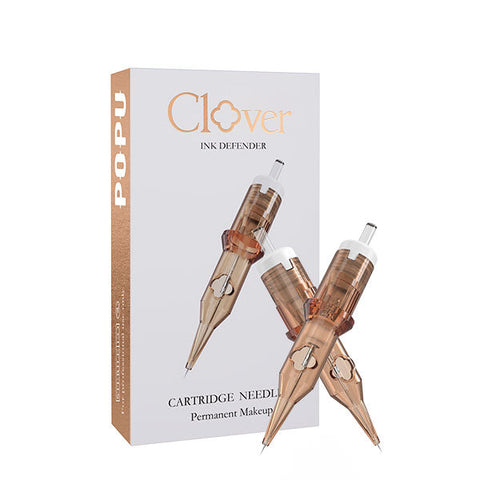
Choose POPU Clover when its named taper or shading configuration is the feature you want to add. The range comes in 20-cartridge boxes. For lines, Clover RL offers Long Taper and Medium Taper at both 0.25 mm and 0.30 mm in the single-point configurations. Keep diameter and count the same to compare the taper choice. For a grouped liner, 0803RLLT gives you three 0.25 mm points with Long Taper.
For compact shading, Clover 0803RS uses three 0.25 mm points; the Pinky Pro RS examples above use 0.30 mm. For a row-based edge, Clover F/CF offers three-point Flat and five-point Curved Flat, both at 0.25 mm. For mist shading, Clover MS keeps three points in its shower-style arrangement and offers 0.25, 0.30 or 0.35 mm.
Keep Pinky Pro as the broad configuration and pack-size choice, and choose Ultra when its leading hardness and toughness in the ATTO range are your priority. Misty offers another 20-cartridge route across liner and shading configurations. Choose Clover for the particular taper or grouping you want to work with, then select that full code on its family page. A named configuration gives the new range a clear job alongside the cartridges you already use.
Start with a useful pair, then choose the quantity
For regular brow detail and soft shading, a practical first comparison is Pinky Pro 1R / 0.20 or 0.25 mm plus a 3RS or 5RS. The 1R serves individual lines and finishing work; the RS serves local shading. If broader filling is a regular part of your technique, add a U or CM configuration instead of relying on the fine-detail cartridge for the whole area. Select each configuration through its product page to build a working selection around your appointments.
Choose a 10-cartridge pack when introducing a Style and a 20-cartridge pack once it has become part of your regular work. For a concrete price comparison, on 2 October 2026 in USD, Pinky Pro 0801RL / 1R / 0.25 mm is $7.29 for 10 and $14.49 for 20, without the finger sleeve. That is $0.729 versus $0.7245 per cartridge. For a configuration you use regularly, the 20-cartridge box gives you twice the supply in one purchase. Choose it when you want your core Style ready for more appointments, with fewer repeat orders for that cartridge. Prices shown in the selector at purchase apply.
For your next order: choose 1R if fine lines are the priority, RS if you need local soft shading, or U/CM if wider coverage is the job. Open the linked configuration, select the diameter and choose your pack. Keep fine detail, soft colour and broader coverage ready on your workstation, with a configuration chosen for each job.
Turn the working pair into an order with the PMU cartridge replenishment guide, which connects regular consumption with pack quantity.
Keep the exact choices ready for the next appointment with a cartridge record organised by connection and full Style.
Questions artists ask when choosing
Can I use 1R for shading as well as lines?
Yes. Pinky Pro 1R supports detailed filling as well as line work. Choose it for small areas and selective detail; RS or a broader arrangement is the more useful comparison when coverage becomes the main job.
Which diameter should I compare first for fine brow work?
Start with 0.20 and 0.25 mm in Pinky Pro 1R. The 0.20 mm option gives you a finer point; 0.25 mm gives you more needle body. Finer 0.16 and 0.18 mm choices extend the range for delicate work.
How do I choose between Pro and Ultra?
Choose Ultra when its hardness and toughness advantage is your priority and its available configuration suits the work. Choose Pro for a wider choice of diameters, arrangements and pack sizes.