

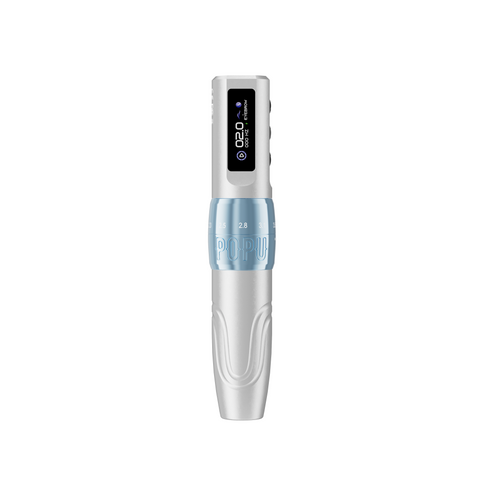
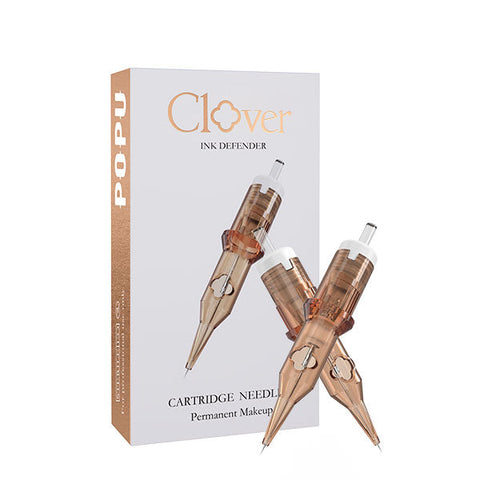


Choose the Black Biomaser U1 with two batteries if standard universal cartridges cover the work and the artists want adjustable stroke. Pair it with Pinky Pro 0601RL for fine detail and Pinky Pro 1003RS for compact shading. Choose the Black P90 Pro with two batteries if standard universal and BMX threaded cartridges both have a recurring job. Its two interchangeable grips let you use the matching cartridge route on one fixed 3.0 mm pen.
The interface is the connection between the cartridge and the approved machine or grip. The needle geometry is the working shape you buy for a line or field. Power is a third decision. A box can have the right number of points and the wrong connection. A pen can support two cartridge routes and still be one working body. Keep those distinctions clear when you select equipment, prepare a second station or estimate supply costs.
On this page
- Identify the interface before the needle
- Compare universal and BMX threaded setups
- Choose the machine and power package
- Match needle geometry across routes
- Standardize a multi-artist studio
- Build an order around real consumption
- Validate changes on a controlled bench
- Choose a migration plan for the studio
- Compatibility and purchasing FAQ
Identify the interface before the needle
Start with the installed grip
Identify the exact machine and grip on the station. A machine name is useful, but a machine with interchangeable grips can serve more than one documented interface. Confirm which grip is installed before opening a cartridge. If two artists share a body and use different interfaces, include the grip in the handoff. This is a quick way to prevent a correct cartridge from being opened for the wrong setup.
Treat fit and drive engagement as separate checks
The housing has to seat in the intended connection. The moving assembly also has to engage the machine as described in its directions. A close-looking attachment is not enough to establish compatibility. Use the approved cartridge and grip pairing. If seating or motion seems irregular, stop and inspect the setup according to the equipment instructions. Repeat with a fresh compatible cartridge if appropriate. Avoid improvising a connection or forcing a shell into a grip.
Read the box in the order you work
Read the interface first. Then read the configuration, diameter and taper where applicable. Check the named option if the range distinguishes a backflow version. Finally, confirm the pack quantity. A 1R code identifies a single-point grouping, but the same label can appear on a universal cartridge and a threaded cartridge. The interface determines where it can be used. The grouping determines what mark it is suited to make.
| Question at the station | What to identify | Where to check | What the answer controls |
|---|---|---|---|
| Which body is in use? | Exact pen | Machine documentation | Supported grips and power |
| Which grip is installed? | Universal or documented BMX threaded | Product instructions and setup | Cartridge connection |
| What mark is needed? | Grouping and diameter | Exact cartridge option | Working footprint |
| Which construction option applies? | Documented backflow version or other selection | Product listing and package | Correct variant |
| How much stock does the station need? | Exact pack and actual consumption | Listing and appointment mix | Reorder quantity |
Confirm replacement stock before an unfamiliar service
If you are covering another artist's room, look at the equipment already set up and verify the exact cartridge range before bringing supplies. A label such as fine liner tells you the role. It leaves the interface unresolved. Ask for the machine and grip names, then match the configuration on the unopened package. This check also works when a school provides equipment to visiting instructors. A visiting artist can bring the approved grouping for that station or arrange a separately approved machine with its own supplies. Establish the answer before the first scheduled service.
Compare universal and BMX threaded setups
Standard universal is a documented connection
A standard universal cartridge route is useful when several approved machines accept the same family. It lets a studio plan around common consumables and gives assistants a clear replacement option. Start with the machine list. Verify each model and grip before you count it as part of the common station. An established universal setup is valuable because the approved route is easy to repeat and supplies can serve the artists who actually use it.
BMX is a specific threaded route
A threaded shell engages a matching threaded grip. BMX names the threaded product route covered here. Buy BMX cartridges for the specific matching BMX grip and use that combination according to its directions. A different threaded system needs its own compatibility evidence. This is especially important when a studio buys for several rooms or receives stock described only as threaded. Use the exact product and grip name on the order.
A dual-grip machine makes two routes available in one body
The P90 Pro includes interchangeable standard universal and BMX threaded grips. This allows a studio with a recurring role for each cartridge system to use the appropriate grip on the same body. Keep the two groups of cartridges easy to distinguish on the station. An assistant preparing the next appointment should be able to see which grip and compatible grouping are intended. Plan independent working bodies when two artists need to work simultaneously.
| Comparison | Standard universal route | BMX threaded route | Studio decision |
|---|---|---|---|
| Required connection | Compatible standard universal machine or grip | Matching BMX threaded grip | Check the installed grip first |
| Example machine | U1 or P90 Pro universal grip | P90 Pro BMX threaded grip | Choose one or both based on recurring work |
| Fine-detail example | Pinky Pro 0601RL, 0.20 mm | BMX 1R, 0.20 mm, backflow version | Confirm role and exact pack |
| Compact shading example | Pinky Pro 1003RS, 0.30 mm | BMX 3RS, 0.30 mm, backflow version | Compare the complete approved setup |
| Stock arrangement | Shared where compatibility is confirmed | Dedicated to matching threaded stations | Keep different connections identifiable |
Compare two routes without comparing two different lessons
A training manager can show the two connections as a preparation exercise, then choose one working mark to compare. Use two documented grips on the P90 Pro and keep the machine body fixed. For a fine reference, select the two single 0.20 mm examples. For a short shaded field, select the two three-point 0.30 mm examples. These tests compare the complete compatible routes. A difference between the resulting marks can reflect more than the connection. Point out the effect the learner can see and keep the product identity clear so the exercise can be repeated.
Choose the machine and power package
Buy U1 for an adjustable universal station
The Biomaser U1 has six adjustable stroke settings from 2.0 to 3.5 mm and a standard universal cartridge connection. Its two-battery package includes two 850 mAh batteries. Choose it when the work uses universal cartridges and the artist wants to vary the machine's mechanical travel across detail, shading and contours. Prepare compatible charged spare power according to the directions. This gives the wireless station a working module and another ready for later appointments.
Buy P90 Pro when both grips have a recurring job
The P90 Pro offers a fixed 3.0 mm stroke, the two documented grips and a 1000 mAh battery specification with USB-C charging. Start with the two-battery selection for a busy wireless station. Choose this machine when the universal setup does regular work and a documented BMX threaded selection still serves an established task. A second grip adds a compatible route. To run two concurrent stations, plan a working machine, power and compatible consumables for each.
Keep stroke travel separate from needle projection and depth
Stroke describes the machine's mechanical travel. It is useful for understanding the configuration and comparing machines. The amount of needle visible at the tip and the way a mark is made depend on the setup and technique. When an artist changes machine, grip or cartridge, rehearse the intended mark on a suitable synthetic material with approved products. A fixed stroke can support a familiar mechanical setup. An adjustable stroke can give an artist useful choices within a single compatible system.
Choose spare power before the calendar fills
For a station that works through consecutive appointments, the two-battery packages let staff prepare a charged matching spare before work. Use each product's compatible power and charging directions. Choose the package around the station you are equipping. A spare module serves the body it fits, and the cartridge interface determines which consumables the grip accepts. Keep these decisions distinct when you compare the complete equipment order.
| Machine decision | U1 | P90 Pro |
|---|---|---|
| Interface | Standard universal | Standard universal and BMX threaded via interchangeable grips |
| Mechanical stroke | Six positions, 2.0–3.5 mm | Fixed 3.0 mm |
| Recommended wireless package | Two 850 mAh batteries | Two-battery package, 1000 mAh specification |
| First use | Adjustable setup with universal cartridge supply | One body serving two documented cartridge routes |
| Revisit if | A recurring task needs a different supported interface | Two artists need independent bodies or adjustable stroke is required |
Match needle geometry across routes
Compare a fine reference at the same nominal diameter
For universal use, Pinky Pro 0601RL gives a single 0.20 mm working point. For the P90 Pro with the matching BMX grip, choose BMX 1R 0.20 mm, backflow version. Start with a short fine reference on suitable synthetic material when comparing these approved routes. Both provide a single point at the same nominal diameter. The tip, taper and complete assembly can still affect the mark, so compare the result in the actual compatible setup.
Compare a compact shader around the same field
For universal use, Pinky Pro 1003RS provides three 0.30 mm points in a round shader. For the matching BMX route, choose BMX 3RS 0.30 mm, backflow version. Use both only if they each belong to a documented compatible station. Put an equal compact field beside a clear edge in a controlled practice comparison. This helps the instructor identify whether the group is useful for the area and how the whole setup feels around the boundary.
Separate an individually visible line from a grouped contour
A single point serves a deliberate fine mark. A compact round liner groups several points for a different contour. If the threaded station needs the latter, the BMX 3RL 0.25 mm, backflow version is a defined three-point option. Keep that purchase separate from the 3RS shading choice. The same number of points can serve a different purpose when their arrangement changes.
Separate diameter and taper from attachment
Diameter is the nominal size of the individual needle wire. Taper is the profile leading to the point. Arrangement describes the positions of the points in the group. When you match a cartridge across two routes, start with the geometry most relevant to the intended mark. A narrow start and finish may make the single point the key feature. A compact shaded field can make the three-point arrangement more relevant. If the taper is documented for one option only, compare both as complete cartridges and use the known specifications when explaining the difference.
Standardize a multi-artist studio
Make a short list of real station combinations
List the machine and grip at each station, then write the groupings it uses for its regular services. Keep approved combinations together. A useful example is a universal station with U1, 0601RL for fine detail and 1003RS for compact shading. A second station may use P90 Pro with the BMX grip for a role the artists already understand. An exact list gives the person receiving supplies enough information to send each box to the correct station.
Share only what the machines actually share
If two stations use the same documented universal cartridges, they can draw from the same unopened stock. When one uses the BMX grip, its threaded cartridges need a separate place. If a single P90 Pro changes grips, arrange the appropriate cartridge and compatible grip for the next job through the studio's normal setup process. A shared machine can reduce the need to buy a second body for sequential work. It cannot cover a concurrent booking by itself.
Build a handoff that an assistant can perform
At the start of a session, identify the machine, installed grip and planned grouping. The assistant can then match the unopened item before placing it in the prepared area. For a grip change, follow the manufacturer's and studio's instructions. Ask the artist to confirm the intended connection before the cartridge is opened. This protects both the working rhythm and the supply order. A box intended for another station can stay in clean stock.
Keep academy and treatment stock distinct
An academy may use one approved machine and grouping for a specific module. Keep those training supplies separate from the working stock used at treatment stations. If a module compares both cartridge routes, give each learner the documented compatible pairing and identify which group creates which mark. When only one connection is taught, choose that route for the class order. The equipment list should support the learning task and preserve the correct setup for every learner.
| Studio arrangement | Working bodies and grips | Stock policy | First purchasing decision |
|---|---|---|---|
| One artist using universal cartridges | One compatible universal pen | One documented universal line and shading pair | U1 with two batteries if adjustable stroke fits the work |
| One artist using both routes sequentially | P90 Pro with both approved grips | Separate universal and BMX options | P90 Pro with two batteries and one exact pair for each recurring role |
| Two simultaneous universal stations | Two independent compatible bodies | Shared unopened compatible stock | Confirm both stations use the same approved supply |
| Concurrent universal and BMX work | Two working bodies with the correct connections | Dedicated stock for each route | Budget equipment for both stations |
| Academy using one route per module | Approved training setup for that lesson | Teaching supply separate from treatment stock | Order the exact grouping and enough for the assessed attempts |
Keep the receiving check close to the purchase decision
When stock arrives, compare the order with the package before moving the box to the station. Confirm the interface, grouping and named option. For the BMX examples in this guide, the backflow variant is part of the specified P90 Pro combination. If an incoming box has the right diameter and a different named option, resolve that difference before opening the packs. A clear receiving check is especially useful when one team member orders and another prepares the treatment room. It keeps a correct-looking item from being used on the wrong route.
Build an order around real consumption
Convert appointments into units and boxes
Count the compatible items actually used by the services scheduled at each station. Suppose a universal station expects twelve fine-detail appointments using one 0601RL each and six compact shading appointments using one 1003RS each. One 20-cartridge box of each covers that illustrative schedule and leaves eight single liners and fourteen shaders for another period. If some services use both, count both groupings for those services. Use the studio's own procedures and hygiene rules when forecasting consumption.
Compare the cost of the exact packages
Pinky Pro boxes linked here contain twenty cartridges per selected variant. The BMX options above contain ten. Compare the displayed price divided by the number of units in that exact box, then multiply by the number needed for the period. For a hypothetical threaded station that needs twelve 1R units, two boxes provide twenty. The eight remaining units stay available for compatible work. Keep the cost of equipment, supplies and unused stock distinct so the studio can see whether a change would solve a real constraint.
Build the buffer around the supplies that matter
For a recurring service, note the configuration that would stop the station if it ran out. Hold enough compatible stock to cover the next planned service period and normal replenishment timing. A rarely used threaded grouping may need a smaller reorder than a universal grouping used throughout the week. Revisit the order when the appointment mix changes. A reorder list that treats every box alike can leave one key role short while another remains overstocked.
| Cost question | Use this input | Calculation or check | What it helps decide |
|---|---|---|---|
| How many units? | Planned uses by exact compatible grouping | Sum uses for each station | Which boxes belong in the order |
| How many boxes? | Units required and exact pack count | Round up to full boxes | Whether ten or twenty matches the work |
| What does each unit cost? | Current price and exact pack quantity | Divide price by units | Compare equivalent purchase units |
| What capacity is missing? | Concurrent artists and available bodies | Compare staffed stations with working equipment | Whether another pen is required |
| Which supply merits a buffer? | Recurring demand and replenishment time | Identify the role that would stop a booking | Prioritize the working configuration |
Estimate the order for two different stations
Suppose the universal chair needs sixteen fine-detail cartridges this month and the separate threaded chair needs eleven. One 20-pack serves the first chair and two ten-packs serve the second. The resulting quantities cannot simply be pooled because the chairs use different interfaces. If both chairs later move to a tested common universal route and keep the same service requirements, estimate their combined demand at twenty-seven compatible cartridges. Two 20-packs would cover that illustrative demand. Compare the unit price, number of boxes and cost of changing equipment before deciding whether a shared route makes sense. Keep the threaded route when it still performs work the team has deliberately assigned to it.
Validate changes on a controlled bench
Check the assembled equipment before opening more stock
Use the equipment instructions to confirm the correct grip and seating. Verify the approved cartridge and the exact configuration before proceeding. Try one short exercise on an appropriate synthetic material and inspect the planned mark. If the equipment behaves irregularly, pause and check the setup with the documented procedure. Try a fresh compatible cartridge where appropriate. This small first check is more useful than opening multiple boxes for a configuration the studio has yet to verify.
Compare like marks on each approved route
Use the same guide and scale for a fine line or a compact shaded area. Compare the 0.20 mm single-point options when the exercise is about a fine reference. Compare the 0.30 mm three-point shaders when the goal is local coverage. Check the same start, turn and endpoint on both samples. Then decide which complete compatible setup suits the intended role. Keep the result tied to the devices and configurations you actually compared.
Check that the change fits the room's normal workflow
Ask the next artist or assistant to locate the correct unopened cartridge and identify the installed grip. Use the actual station layout and appointment type. If they need to search for the matching grip or cannot distinguish the boxes, revise the physical arrangement before making a larger purchase. Make the required supplies easy to identify in the same sequence they are used. Once the setup works, use it for one supervised run through the normal handoff.
Keep a documented fallback station available during a change
If you are evaluating a new compatible setup, test it before moving scheduled work to it. Keep the currently approved setup available until the new station has shown it can perform the required marks and fit the handoff. Plan enough compatible supplies for that short evaluation. Once the studio chooses the route, update the order around the agreed working roles. A small transition protects booked work and keeps the purchase decision based on a completed comparison.
Test the handoff with the actual appointment sequence
A rehearsal can begin with one universal detail service followed by a threaded shading service. Have the next artist identify the required setup from the order of bookings. Confirm who prepares the approved grip and where the other stock stays while the appointment is underway. Then repeat the same sequence with two artists working in parallel. This exposes the difference between sharing a body sequentially and equipping two workstations. A scheduling issue is easier to solve when it becomes visible before another box of cartridges is ordered.
Choose a migration plan for the studio
Consolidate when all recurring work has a verified universal route
If the actual services are covered by the documented universal groupings and artists prefer the adjustable setup, use the U1 two-battery package and the Pinky Pro pair as the starting point. Confirm compatibility across the station list and finish the controlled checks. Standardization then means assistants can prepare the appropriate universal cartridge without also sourcing a threaded replacement. Keep the decision tied to the roles the team has actually evaluated.
Maintain both routes when the threaded setup has a defined purpose
Use P90 Pro when a compatible BMX configuration is a working part of the schedule and the same artist also needs a universal route. Assign the grip by the job. Order the matching backflow variants for the documented P90 Pro threaded setup. In this case a two-route station can preserve a working technique while bringing both approved options onto one body for sequential bookings.
Add a second body for concurrent bookings
If the calendar shows two artists needing the equipment at the same time, purchase an independent working body with its compatible power and cartridge supply. Consider whether both can share one documented cartridge interface. If the jobs use different routes, set up each with the matching grip and stock. A studio adding a second body should be able to point to the work it allows the team to do at the same time.
Use a service change as the trigger to revisit the order
Review the station list when a new artist joins, a new service is added or an academy introduces another equipment module. Ask whether the existing approved cartridges cover the new role. If a different grouping serves the work on the same connection, change the order at the cartridge level. If the task calls for a different documented interface, compare the appropriate machine and grip before ordering a large supply.
Compatibility and purchasing FAQ
Can a universal cartridge fit every PMU pen?
Check the exact machine and installed grip. Use the documented universal route only on equipment that supports it. If a station uses a specific threaded grip, choose its documented cartridge family.
Does a 1R label establish compatibility?
A 1R code identifies a single-point grouping. Read the connection separately. A universal 1R and a BMX threaded 1R can share a nominal diameter and still require different grips.
Which machine should I buy for a universal-only station?
Choose the U1 with two batteries if its standard universal connection and six 2.0–3.5 mm stroke positions fit the work. Add Pinky Pro 0601RL for detail and 1003RS for compact shading.
Which setup keeps both cartridge routes available?
Choose P90 Pro with two batteries and both documented grips. Use Pinky Pro with the universal grip and the specified BMX backflow variants with the matching threaded grip.
Can two artists share one P90 Pro at the same time?
The two grips serve one pen body. For concurrent work, give each artist an independent compatible machine, working power and the right cartridge supply.
How should I compare a universal and threaded shader?
Use the same intended field and compare the complete approved setups with a similar grouping. The Pinky Pro 1003RS and BMX 3RS backflow options both have three nominal 0.30 mm points. Check how each behaves with its matching equipment.
Which threaded cartridge should I buy for fine detail?
For the documented P90 Pro BMX setup, start with the 1R 0.20 mm backflow version. Add the 3RS 0.30 mm backflow version when compact shading is part of the schedule.
How can I compare ten- and twenty-cartridge boxes fairly?
Use the exact current price divided by the quantity in the selected box. Then compare how many units the compatible station needs and what remains after the scheduled services.
What should an assistant check before opening a cartridge?
Confirm the machine, installed grip and exact cartridge configuration. Check the packaging and follow the studio's setup procedure. If the combination is unfamiliar, ask the artist to confirm it before opening.