

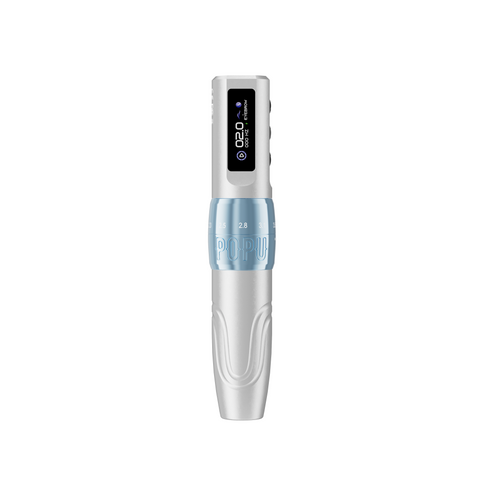


When several brow appointments share the same station, choose the Black Mini DIVA Pro with two batteries if you want a compact pen and two memory modes for settings you return to during the day. Choose the Black Biomaser U1 with two batteries when the U1 is already the pen you reach for and you want the next station to feel familiar.
Compare the two black dual-battery versions
| Decision factor | POPU Mini DIVA Pro | Biomaser U1 |
|---|---|---|
| Stroke control | Six positions, 2.0–3.5 mm | Six positions, 2.0–3.5 mm |
| Power in this package | Two 800 mAh batteries | Two 850 mAh batteries |
| Published body diameter | 24 mm | About 22 mm |
| Cartridge connection | Standard universal | Standard universal |
| Best reason to buy for this diary | Compact station with two memory modes for frequently used settings | Familiar slim hold when adding a station to an existing U1 setup |
For a fresh station, the Mini DIVA Pro combines a 135 × 24 mm, 120 g body with a coreless motor and six stroke positions. It earns its place when you want a compact hold and keep returning to the same detail and coverage settings. Its memory modes help bring those electronic settings back quickly. The stroke collar is a separate mechanical adjustment. Check the collar position as part of the changeover when the next appointment calls for a different motion. With the U1, the purchase case is particularly strong when an experienced artist can move between two rooms and pick up the same body shape and adjustment range in both.
Compare battery capacity alongside the way your studio turns over the station. A charged spare gives the next appointment an immediate power handoff while the first pack returns to charging. For consecutive appointments, the operational gain comes from having a second model-matched pack ready when the station is reset. Choose the dual package even if the first pack usually covers an appointment. You are buying a spare power path for the day.
Build the changeover around two kinds of brow work
Compare a sparse brow front with a soft tail on a flat silicone sheet. Start with the 0601RL to see whether you can place a short individual mark without obscuring its endpoint. Move to the 1003RS for a small patch of soft coverage. Three pins give that pass a different footprint from a single liner, so the shading grouping changes what the hand can cover even before you alter the pen's stroke. Compare shorter and longer positions on the same synthetic pattern and grouping to learn which mechanical feel you want for each action. Then make the final choices for client work within your established professional practice.
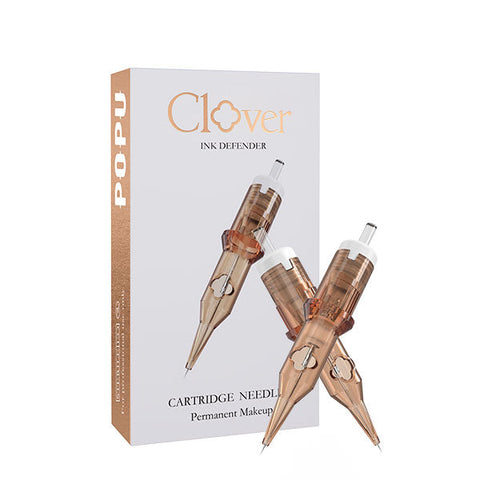
Both Pinky Pro groupings use EO-sterilised 304 stainless steel needles. Their clear PC bodies let you see the cartridge assembly, and the silicone anti-backflow membrane provides a barrier between the working end and the handpiece. That gives you the same cartridge construction in the two groupings you are likely to switch between on a busy brow day. Stock both boxes so that changing the footprint is a deliberate decision and each appointment has the right fresh cartridge available.
Keep the two brow groupings ready
Both use standard universal cartridges. Keep Pinky Pro 0601RL, 20-pack for fine strokes and Pinky Pro 1003RS, 20-pack for soft coverage. Keeping the same groupings gives you one less adjustment if you move between rooms.
For a new station where you want a compact pen and quick access to repeat settings, buy the Black Mini DIVA Pro with two batteries and both Pinky Pro boxes. For a second U1 station, order the Black dual-battery U1 with those same two boxes.
FAQ
Which version should I buy for a full brow diary?
Choose the two-battery version of either pen. Keep one model-matched pack ready while the other is on the machine.
Which Mini DIVA Pro feature helps when I switch tasks?
Its two memory modes let you return to settings you use regularly. The six stroke positions give you a separate mechanical choice when moving between finer detail and shading.
Does selecting a memory mode change the mechanical stroke?
The memory mode recalls a setting on the Mini DIVA Pro. Adjust the mechanical stroke at the collar when the next task calls for a different position.
If I equip a second U1 room, do I need a different cartridge family?
Keep the same standard universal Pinky Pro liner and shader across the rooms. Buy model-matched power for the U1 and use the same two cartridge footprints in both stations.